Преминете от Airtable
Обновено
You can bring your Airtable bases to Artavolo in a few minutes, with their records, links between tables, formulas, files and comments. Nothing in Airtable is changed. If you want, Artavolo keeps the copy in step with Airtable every hour, so your team can try it on live data before you switch.
Step 1: Connect your Airtable account
- On Home, click Пренесете вашата база от Airtable. (It is also the Airtable tab in the Импорт window.)
- If you see Connect Airtable, click it, sign in to Airtable and allow access. That is all.
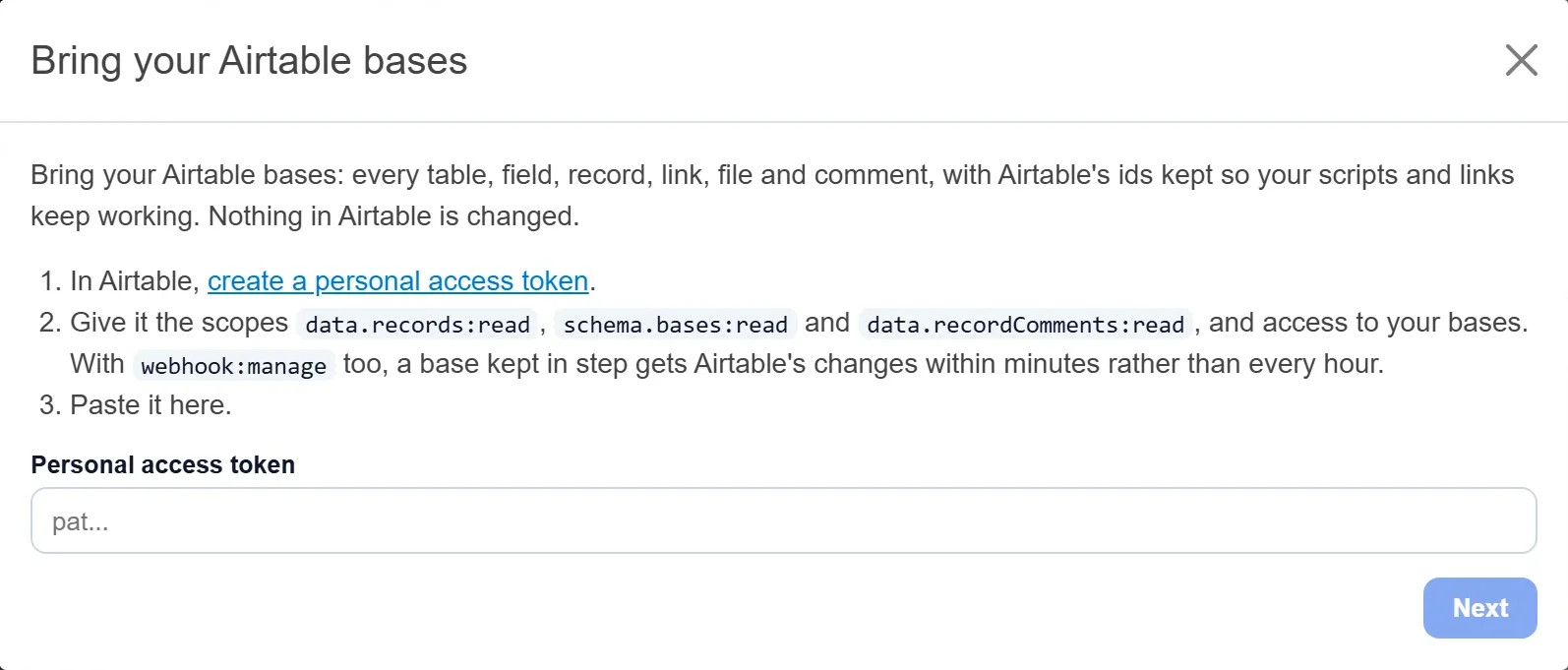
- If not, Artavolo needs a key from Airtable, which Airtable calls a personal access token. Click create a personal access token in the window. In Airtable, give it the scopes
data.records:read,schema.bases:readиdata.recordComments:read(andwebhook:manageif you can, so changes arrive within minutes rather than every hour), and give it access to your bases. Copy the token, paste it into Personal access token, and click Напред.
Step 2: Pick your bases and bring them in
- Под Кои бази? отметнете базите за прехвърляне. Няколко наведнъж е наред.
- Leave Keep them in step with Airtable every hour until I switch ticked to try Artavolo on your live data first. Untick it for a one-off copy that you start using here straight away.
- Click Bring it in (or Bring them in for several). A progress bar shows the tables, records, comments and files coming over. You can close the window: the copy carries on.
Step 3: Read the report
When a base is in, the window says Вашата база е тук, with the records counted per table, and then:
- Formulas, lookups and rollups, checked against Airtable: Artavolo works out each formula itself and compares the answer with Airtable's for every record. A line says, for example, "Matches Airtable on all 5,000 records", or how many differ, with the first few.
- What is different from Airtable: anything that needs your attention.
- Хора: those named in the base who are not in your workspace yet, with Invite them as contributors.
Step 4: Work through the checklist, then switch
An owner of a base brought from Airtable sees a button at the bottom right: Преминаване от Airtable, with how many steps are done. Click it for the checklist: ten steps from "Records came over" to "Switched". Steps the base can see are ticked for you; tick the rest yourself as you go.
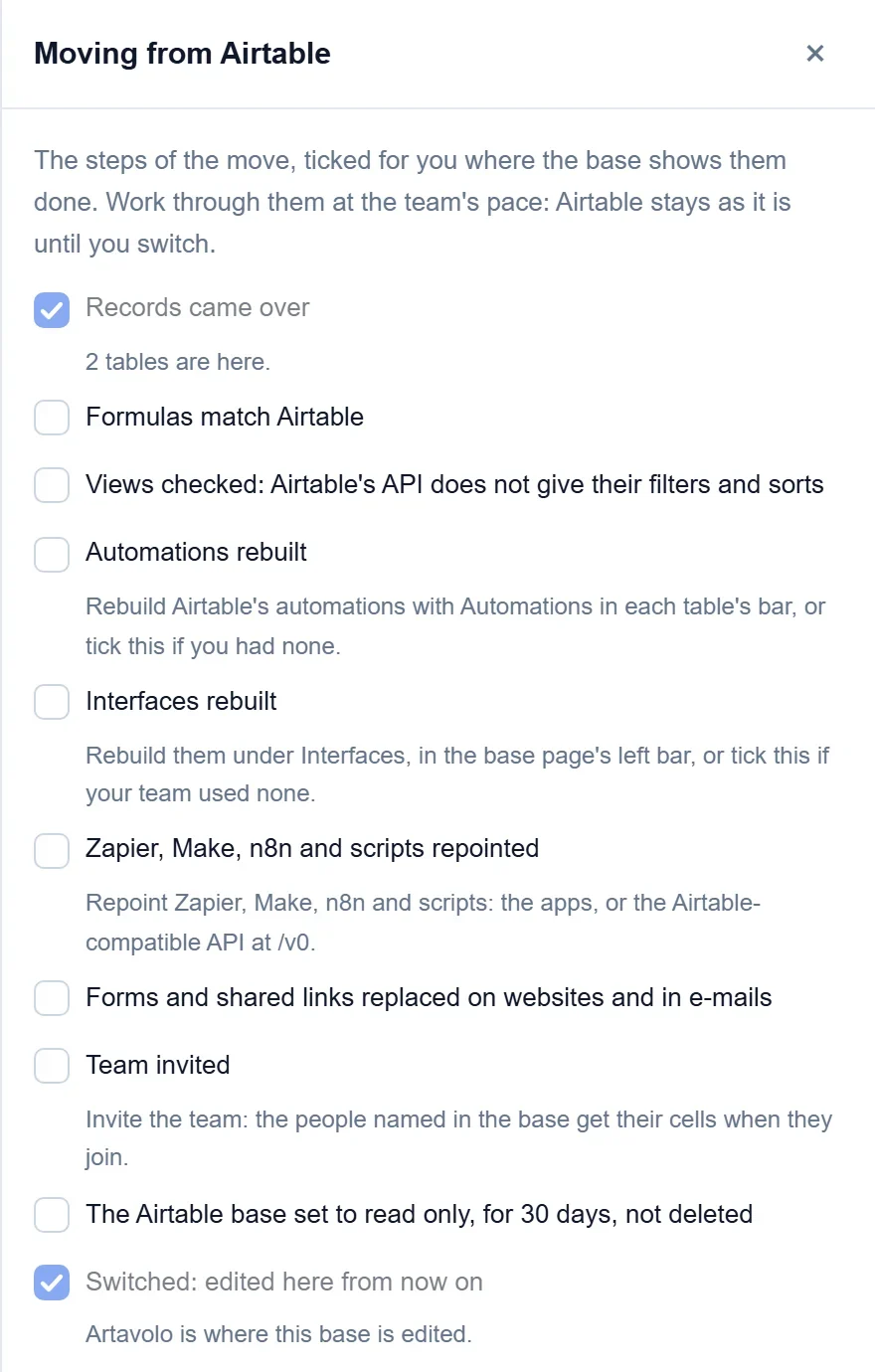
While a base is kept in step, it says Synced from Airtable every hour and cannot be edited here, so nothing is overwritten. Owners can click Sync now at any time. When the team is ready, click Преминете към Artavolo: from then on the base is edited here. Set the Airtable base to read only for a month rather than deleting it.
Какво се пренася
- Every record of every table, in the order of each table's first view, with when it was created.
- Връзките между таблиците, в двете посоки, запис по запис.
- Formulas, lookups, rollups and counts, written the way Airtable writes them (
{Field}). - Attachments, copied into Artavolo, because Airtable's file links stop working within hours.
- Record comments, matched to their authors by e-mail address.
- People in user fields: a workspace member with the same e-mail address, or kept by e-mail until that person joins.
- Автоматичните номера с номерата от Airtable; новите записи продължават от най-високия.
- Airtable's own ids for the base, tables, fields and records, so scripts and links that use them keep working.
Какво да изградите наново
Airtable does not hand over its automations, interfaces, scripts, record history, or the filters and sorts of views. Rebuild automations under Автоматизации and interfaces under Интерфейси, and set each view's filter and sort again. Record history in Artavolo starts on the day of the copy.
Добре е да знаете
- Only owners of a workspace can bring bases in, up to the number of bases on its plan.
- Scripts and the Airtable.js library keep working with this site's address and an Artavolo key: see the Airtable-compatible API.
- Файл, който не може да бъде копиран, остава на връзката си в Airtable и е посочен в отчета.
- За да върнете таблица в Airtable, вижте Експортирайте данните си.