Получавайте известия в Artavolo и на телефона си
Обновено
The bell at the top right of a base tells you when something needs you: a colleague mentions you, someone comments on a record you follow, or an automation sends you a notice. You can also get these on your phone or computer, so they reach you even when Artavolo is closed.
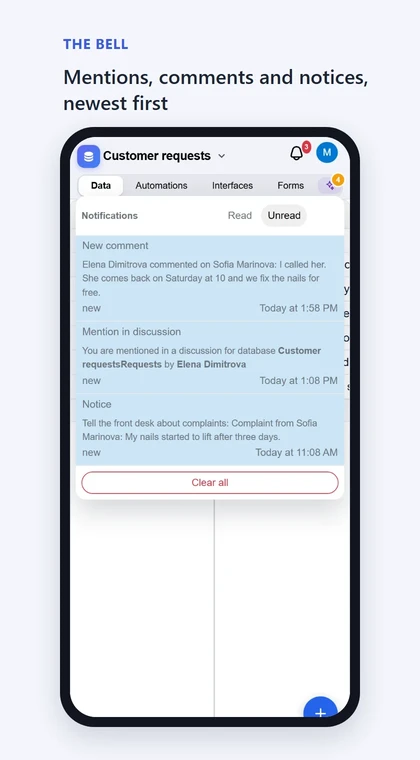
Четене на известията
- Open a base and click the bell at the top right. A red number on it counts what you have not read.
- Превключвайте между Непрочетени и Прочетени.
- Щракнете върху известие, за да го видите изцяло, с връзка към базата.
- Click Зареди още for older ones, or Clear all to empty the list.
On a phone the list opens across the whole width of the screen, under the base's name.
What you are told about
- Mentions. Someone types @ and your name in a comment on a record. A mention you have not seen 10 minutes later is also e-mailed to you, with the comment and a link to the record.
- New comments on records you follow. You follow a record when you comment on it, when someone mentions you in it, when a person field of the record names you, or when you click Notify me in the open record.
- Notices from automations. An automation can send a notice to people's bells, for example "a complaint came in". See Автоматизации.
- Бележки. Бележка е добавена или променена в база, в която работите. Известието идва около 15 минути по-късно, и по имейл.
Get them on your phone or computer
- Отворете камбанката.
- До Получавайте ги на това устройство, дори когато приложението е затворено. щракнете Включи.
- Разрешете известията, когато браузърът попита.
The list then says On this device: on. Each new notification reaches the device shortly after it reaches the bell. Tap it to open the base it is about.
Включете го отделно на всеки телефон и компютър, които използвате, във всеки браузър.
Изключване
- На едно устройство: отворете камбанката и щракнете Изключи.
- Everywhere at once, or just for a while: block notifications for this site in the browser's or the phone's settings.
- To stop the e-mail about mentions: open Моят профил and untick Изпращай ми имейл, когато някой ме спомене.
If the list says This browser blocks notifications from this site: allow them in its settings., you or the browser said no earlier. Allow them in the browser's settings for this site, then click Turn on again.
Обобщение по имейл
Включено Моят профил, Изпратете ми по имейл отчет какво се е променило sends a daily, weekly or monthly summary. Under Отчетът обхваща, choose new and changed notes, new and changed records, or both. Choose Никога to stop it.
Добре е да знаете
- You are told only about records you are allowed to see, and never about your own comments.
- Opening the record counts as seeing a mention, so no e-mail follows.
- To stop hearing about one record's comments, open the record and click Stop notifications.
- On an iPhone, notifications work only in the installed app: add Artavolo to the Home Screen, open it from there, then click Turn on.
- Ако не виждате Включи в камбанката, този браузър не може да показва известия.
- Известията отиват до най-много десет браузъра на човек. Известие, по-старо от един ден, остава в камбанката и не се изпраща на устройствата ви.
- Не е нужен външен акаунт: Artavolo ги изпраща сам, през собствената push услуга на браузъра.
- On a server of your own, notifications are sent each time the scheduled task (cron) runs, and e-mail needs the administrator to set up sending mail.