Филтриране на записи в изглед
Обновено
A filter shows only the records that match what you ask for, such as "tasks of Novak Build that are not done". The others are only hidden, never deleted: clear the filter and they are all back. A filter belongs to one view, so the table's other views do not change.

Добавяне на филтър
- Click Filter in the bar above the records.
- Click + Add condition.
- In the new row, pick the field (such as Contractor), what to compare (such as is) and the value (such as Novak Build). The view changes as you go.
- For another condition, click + Add condition again.
- Click anywhere outside the panel to close it.
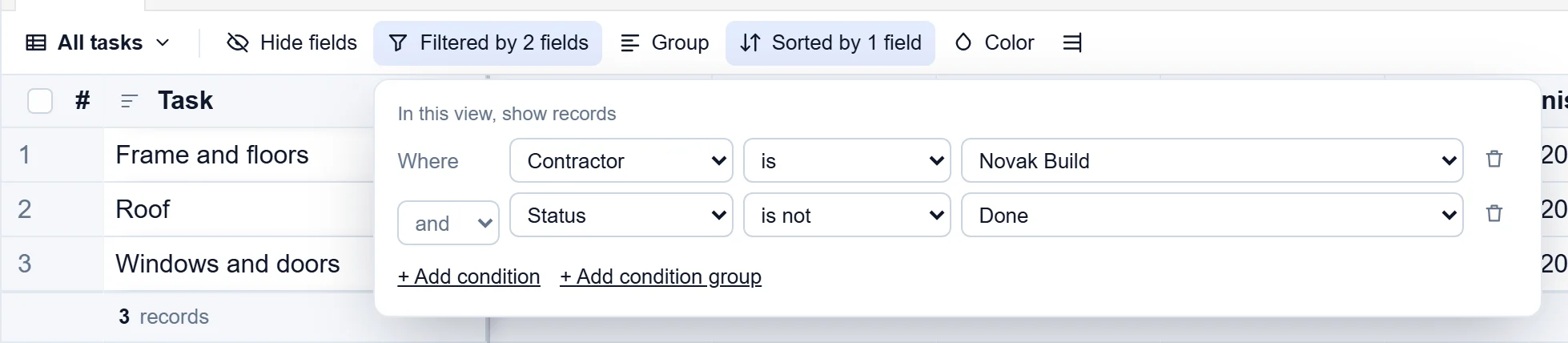
The button in the bar then says what the view is filtered by, such as Filtered by 2 fields, and the number at the right of the bar shows how many records are left.
Pick what to compare
- Текст: съдържа, не съдържа, е, не е, е празно, не е празно.
- Numbers: = (equal), ≠ (not equal), < (less than), > (more than), ≤ and ≥.
- Single select (one choice from a list): is, is not, is any of, is none of. Multiple select: has any of, has all of, is exactly, has none of.
- Dates: is, is before, is after, is on or before, is on or after и is within. The value can be a day that moves with time, such as today, tomorrow or one week ago, or an exact date. With is within you pick a span, such as the next week or the past number of days.
- Person fields: pick Me to show the records of whoever is looking, so one view shows each person their own work.
A condition without a value yet filters nothing, so the view does not go blank while you build it.
Комбиниране на условия
With two or more conditions, the word at the start of the second row decides how they work together: и means every condition must match, or means any one of them is enough. For a mix, click + Add condition group to put some conditions in brackets, for example Status is Done and (Contractor is Novak Build or Contractor is Site team).
Премахване на условие
Click the bin at the end of its row. When no conditions are left, the button goes back to Filter.
По-бърз начин
Right-click a column heading and choose Filter by this field. The panel opens with a condition for that field already added.
Добре е да знаете
- Само собствениците на базата запазват филтър в споделен изглед. Другите членове могат да филтрират, докато работят, но филтърът не се запазва за никого.
- To keep a filter just for you without changing what the team sees, make a personal view.
- A filter is not a lock: anyone who may change the view can clear it. To keep people to their own records, use the base's permissions.
- On a phone the panel opens from the bottom of the screen, with each condition stacked to fit.