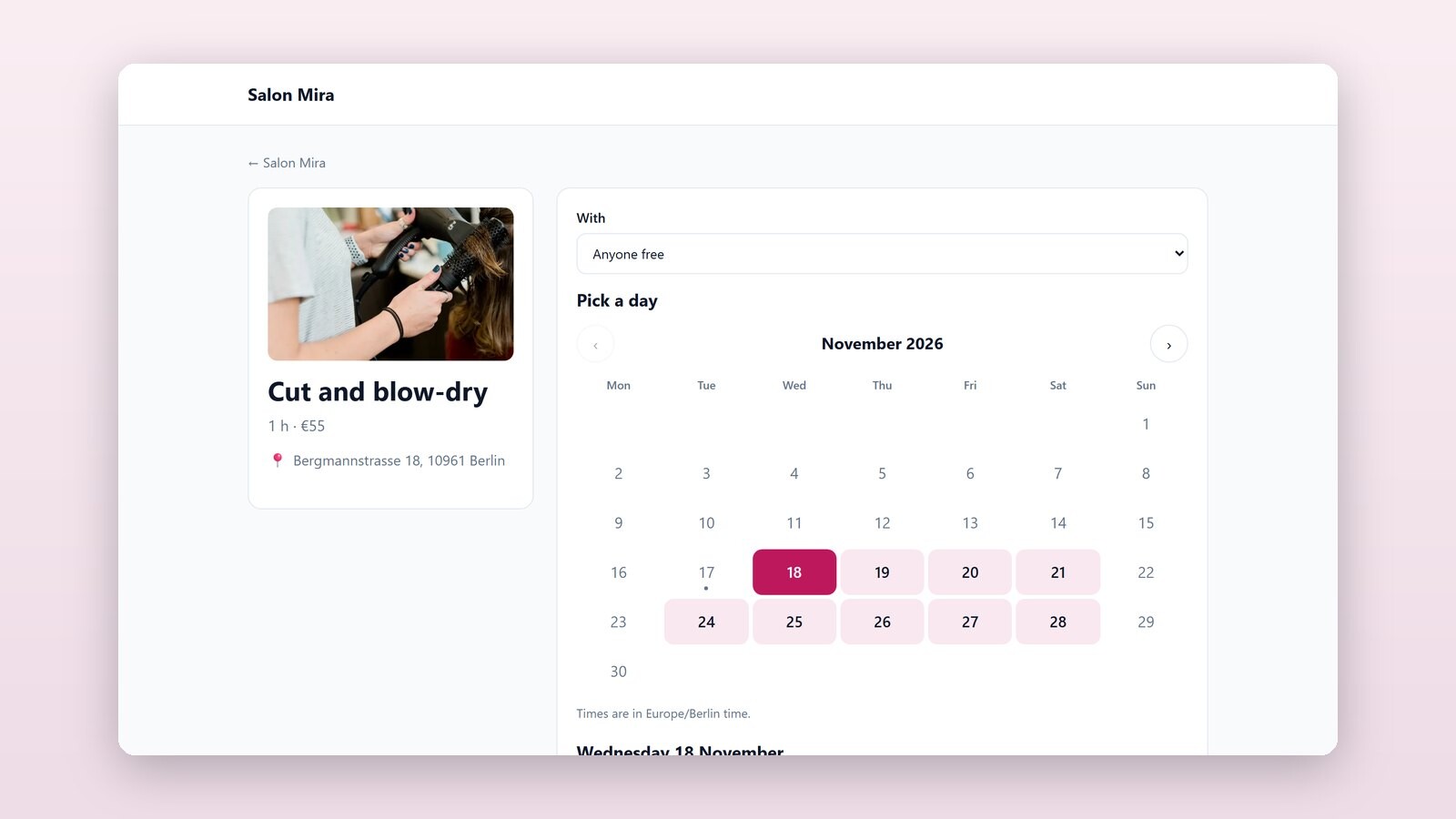
A booking page lets people book you online: a haircut, a visit to the dentist, a driving lesson, a meeting room, or two nights in a guest house. Every booking is a record in your base, and that table is your diary. Change a booking there and the page and your customer follow.
Two kinds of booking
- Appointments: people pick a service, a day and a free time. For clinics and dentists, salons, physiotherapists, lessons, consultations and repair shops.
- Stays: guests pick a room, the day they arrive and the day they leave. For guest houses, holiday flats, cabins and campsites.
What your customers see
The page lists what can be booked, with its length, price, description and photo. A customer picks one, then a day on a calendar where only days with free times can be picked, then a time. They write their name and e-mail, answer your questions if you ask any, and book. Times are shown in your time zone, and the page says so when theirs is different.
They get an e-mail with the details, a link to add it to their calendar and a private link to their booking, where they can move it or cancel it up to the deadline you set. A reminder goes out the day before unless you change it. You get an e-mail for each new booking, change and cancellation.
Which times are free
A time is offered when it is within your opening hours, not on a closed day, far enough ahead, and not taken by any booking in your bookings table. Because the table is read every time, what you do there counts at once: add a record with no service to block an hour for lunch, set a booking's status to Cancelled to free its time, or change its start to move it, and the customer is told.
- Staff: customers choose who they see, or Anyone free. Each person has their own diary and, if you like, their own hours.
- Classes and hire: a yoga class with ten places, or bikes hired until none are left. Classes can run at fixed times, such as Mon, Wed 18:30.
- Busy in another calendar: paste the iCal address of a Google, Outlook or Apple calendar, or of an Airbnb or Booking.com listing, and its busy times are not offered.
- Confirm each booking yourself if you prefer: bookings come in as Requested, and the customer is told when you confirm.
Payment, if you want it
Add a key from your own Stripe account and people pay the whole price or a deposit when they book. The money goes straight to you, and a customer who cancels in time can be refunded at once.
On your own website
Every booking page has its own address, and a code to put it inside your own website. Twelve templates come with a booking page set up, among them a hair and nail salon, a clinic, a dental practice, a yoga studio, a driving school, meeting rooms, a guest house and a campsite. When you use one, pick the time zone it should work in. Booking pages are on every plan.
Who this is for
Anyone whose day is made of appointments or whose rooms are let by the night, and who would rather keep the diary in a table their team already uses than in one more app.
Part 2 of 3 in the series "Your tables, in front of your customers". The other parts:
- Part 1: Sell from your tables: online shops with delivery and cash on delivery
- Part 3: Client portals: each client sees only their own records
Read Booking pages for every setting, or open the hair and nail salon template to try one.