Export your data
Updated
Your data is yours, and you can take it out at any time, on every plan. The everyday way is to download a table as a CSV or Excel file, for your accountant, a mailing or a backup. This page shows that first, then the other ways out.
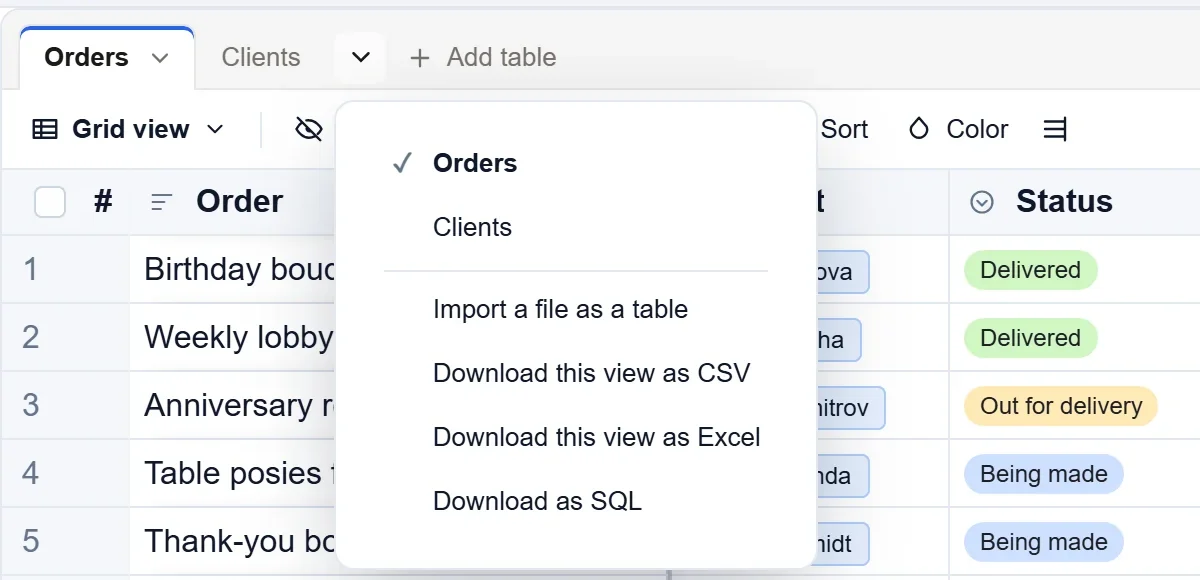
Download a table as CSV or Excel
- Open the table, and the view you want. What the view shows is what you get: its filter, sort and hidden fields decide what goes in the file.
- Click the arrow after the last table tab (it is called All tables).
- Choose Download this view as CSV or Download this view as Excel. The file goes to your Downloads folder.
The file holds the records and fields the view shows, in the same order, written as they read on screen. To get every record and field, use a view with no filter and no hidden fields.
Download a whole base as SQL
Download as SQL, in the same list, gives one file with all the base's tables, links, records, views and automations. SQL is the language databases use, and the file is ready to load into PostgreSQL or Supabase.
Export a table back to Airtable
A table can also be downloaded in the formats Airtable's own import reads. Open one of these addresses while signed in, using the base's code and the table's id from the address bar (or call it with an API token):
/api/v2/bases/{code}/tables/{id}/export?format=airtable-csv: a CSV with the field names as the header, multiple choices joined with commas, tick boxes aschecked, links by the linked records' names and attachments asfilename (url)./api/v2/bases/{code}/tables/{id}/export?format=airtable-json: every record in the shape Airtable's API returns.
A cell a spreadsheet would treat as a formula starts with an apostrophe, so it stays text.
Read everything through the API
An API is a way for another program to read and change your data. An API token is a key that lets it in.
- The REST API reads every table a page at a time, with filters and sorting. See the data API.
- The Airtable-compatible API answers the way Airtable's does, so scripts written for Airtable can read your records here.
- Zapier, Make and n8n can copy new and changed records to other tools as they happen.
Back up everything on your own server
If you run Artavolo on your own server, one encrypted file holds everything: both databases and the uploaded files. Run php utilities/backup.php from the shell on any edition; the Enterprise edition also runs it on a schedule from the administration and can copy it to S3-compatible storage. See Scheduled backups and Backups and restore.
Good to know
- CSV and Excel downloads are for anyone who can see the view, except through a shared view link. Download as SQL is for owners of the base.
- The Airtable export is for anyone who may read the table, and follows the same rules about which tables and records they see as the screen.
- Attached files are not packed into a download; the Airtable CSV lists each one with its link.
- Leaving the hosted service? Export first: deleting your account deletes workspaces that only you use, with their bases and files.