How Artavolo works, in five minutes
Updated
Artavolo keeps the information your team works with in one place, organised like a spreadsheet that knows what each column holds. Your team, your forms, your automations and the AI agents you allow all work on the same tables, with the same permissions.
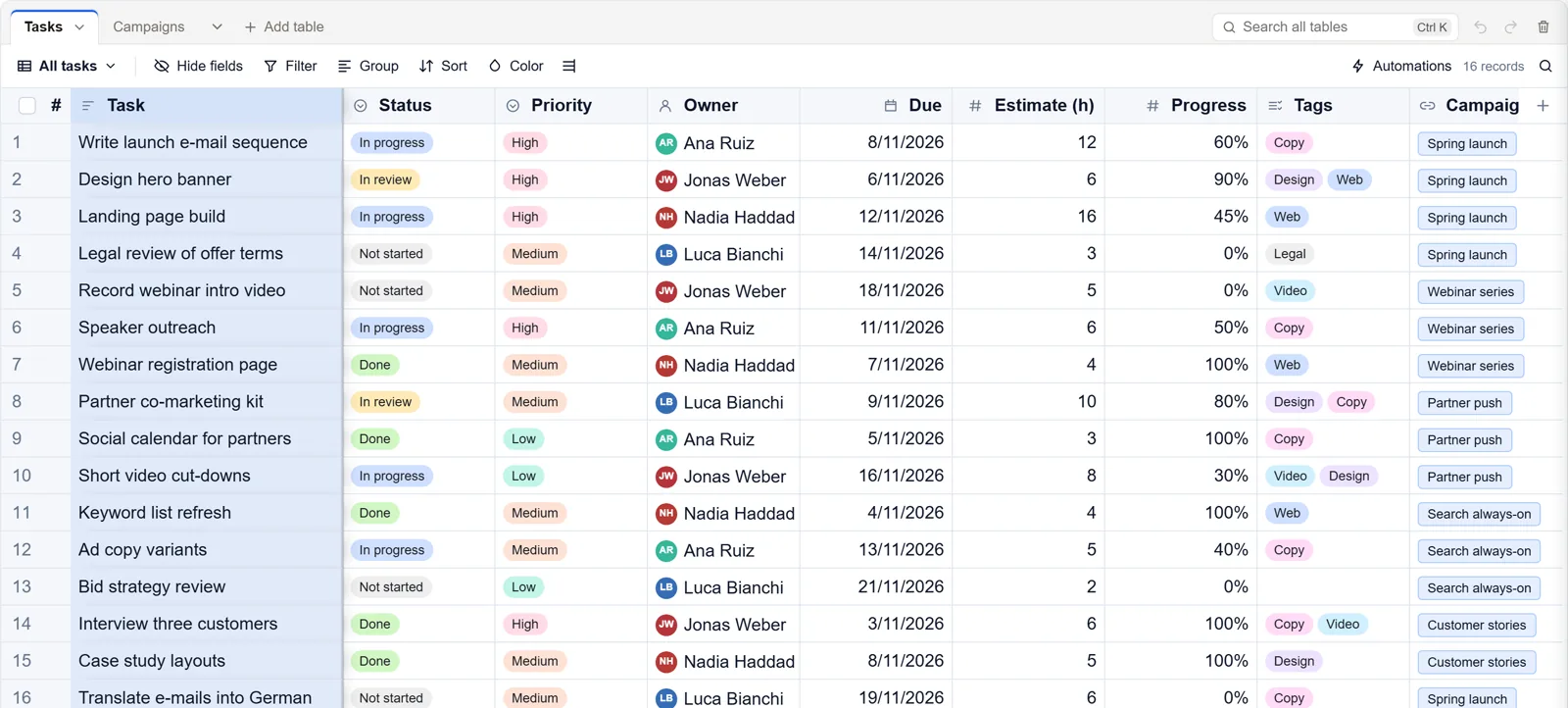
The five words
- Base: one part of your work, such as your clients, your orders or a project. Home lists your bases, grouped by workspace.
- Table: a list of things of one kind inside a base, such as Clients or Orders. The tabs above the grid are the tables.
- Record: one thing in a table, shown as a row in the grid. One client, one order.
- Field: one piece of information every record has, shown as a column in the grid. A field has a type: text, number, date, a choice from a list, a person, a file, a formula, or a link to a record in another table.
- View: a way of looking at a table. The same records as a grid, a board, a calendar, a gallery, a timeline or a Gantt chart, each with its own filter, groups and sort.
Your first ten minutes
- Make a base from Home: Bring your Airtable base, Start from a template, Import a spreadsheet or Start from scratch.
- Click a cell and type, as in a spreadsheet. Every change saves by itself, and Ctrl+Z undoes it.
- Add a field with the + at the end of the field names, and pick its type.
- Make a view for the way you work, such as a board grouped by status or a calendar by due date.
- Invite your team with Share at the top right.
The four sections of a base
Across the top of every base are four sections:
- Data: the tables and their views. This is where you spend most of your time.
- Automations: routine work the base does for you, such as e-mailing you when a record is added. See Automations.
- Interfaces: simple apps on top of the base for people who should see only part of it. See Interfaces.
- Forms: pages anyone can fill in, whose answers become records. See Forms.
The base's name, at the top left, opens the base menu with Notes, Files, Insights and All bases. The logo beside it takes you back to Home.
Help inside the base
The ? beside the bell opens How it works: the five words in one line each, and the common tasks in three steps each. Show me points at the right control on the screen, and Take the 1-minute tour walks you round the base. Pressing ? opens the same panel when no cell or box has the focus.
Good to know
- A workspace holds bases and the people who work in them. Its owners make new bases, within the plan's number of bases.
- In a base, people are Owner, Contributor or Read only. Owners change fields, tables and the shared views; contributors work on records; read-only members look. People who fill in a form need no account.
- There is no record limit on Standard and Pro, or on your own server; a base on the Free plan holds 10,000 records. Deleted records, fields and tables stay in the trash for 30 days.
- On a phone the same base opens with the same sections, and menus open as sheets from the bottom of the screen. See Artavolo on your phone.