Get fixes and ideas from the planning assistant
Updated
The planning assistant reads one of your tables and tells you how to work faster with it: fixes to records it is sure of, and ideas for a view, a field, an automation or an interface. Nothing changes until you accept a fix or create an idea.
It uses your workspace's AI, so a workspace owner has to turn AI on first, with your own key. See Use AI in your bases with your own AI key.
Step 1: Ask for a look at a table
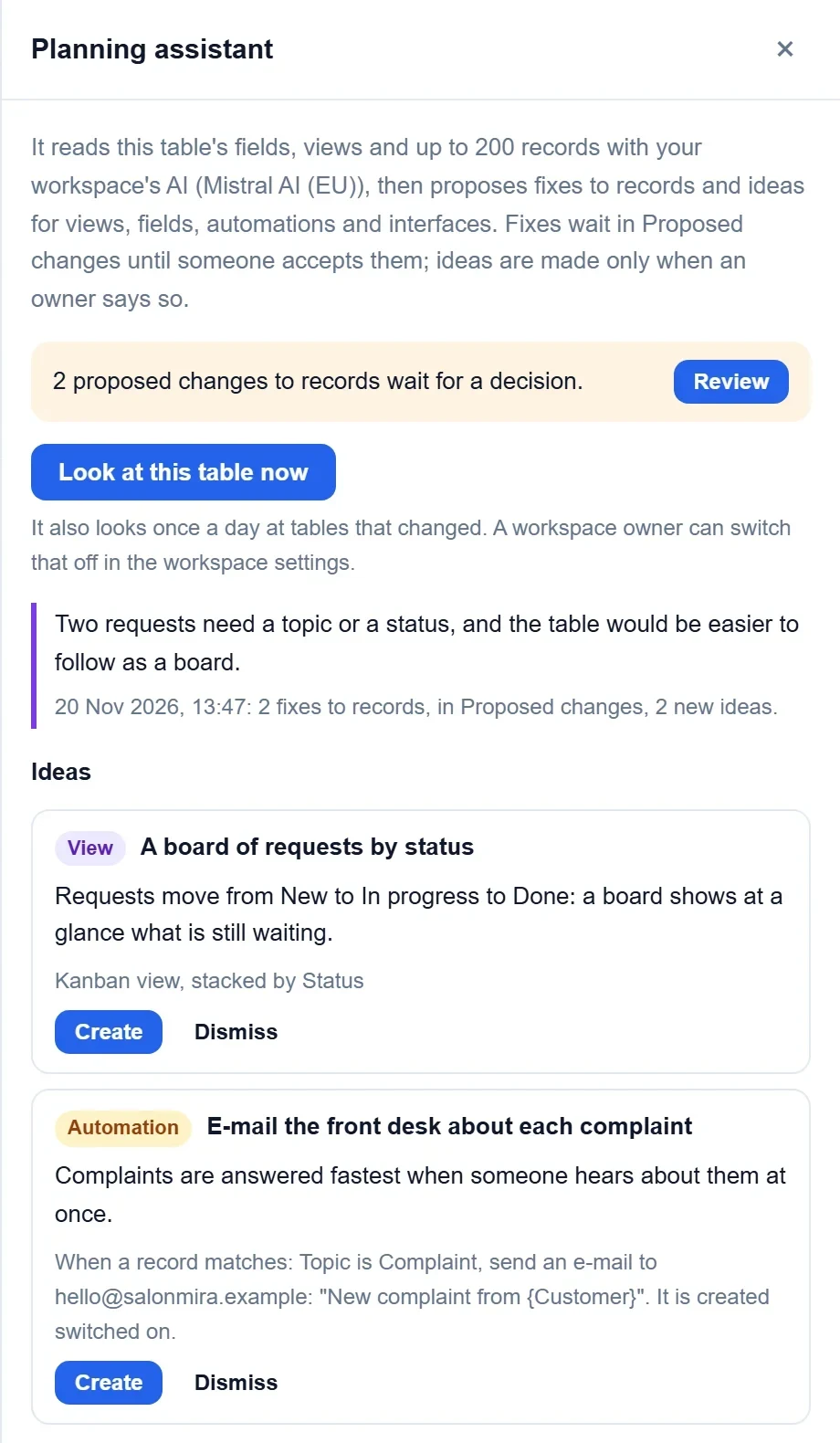
- Open the table and click Assistant at the top of the base, next to Data, Automations, Interfaces and Forms. A number on it counts the fixes and ideas waiting for you.
- In the Planning assistant panel, click Look at this table now.
- Keep working. A look can take a few minutes, and the panel shows what it found when it is done.

If the panel says Switch it on with your own AI key, AI is not on for the workspace yet.
Step 2: Accept or reject its fixes
Fixes to records wait as proposed changes from an agent called "Planning assistant". Two lines over the table tell you when there are fixes or ideas:

- Click Review, on the line over the table or in the assistant's panel.
- Read each change: the record, the field, the old value struck through, the new value and the reason.
- Click Accept or Reject, or Accept all or Reject all.
Accepting works the same as for any agent: see Add AI agents that work on your tables, which shows the Proposed changes panel.
Step 3: Create or dismiss its ideas
Each idea has a title, why it would help, and exactly what it would make, for example "Kanban view, stacked by Status".
- Click See on the line over the table, or open the panel with Assistant.
- Under Ideas, click Create to make it, or Dismiss to drop it.
A new view goes into the views list. A new automation is created switched on and appears under Automations. A new interface starts as a draft for you to publish.
Good to know
- Once a day the assistant also looks at the tables that changed. A workspace owner can switch this off: Settings, Integrations, the AI tab, Planning assistant: look once a day at the tables that changed.
- People who can edit the base can ask for a look and dismiss ideas. Only base owners can create them.
- Each look reads the table's fields, up to 200 of its records, and the names of its views, automations and interfaces. It never sends keys, files or other tables' records.
- Each look is paid by the workspace's AI key, at the service's prices.
- Limits: 40 looks a day per workspace, one look a minute per table, and at most 25 fixes and 6 ideas per look.
- On a phone the lines over the table are not shown: the number on the Assistant button tells you something is waiting.