Get fixes and ideas from the planning assistant
Updated
The planning assistant reads a table with your workspace's own AI key and suggests how to work faster: fixes to records it is sure of from the data, and ideas for a view, a field, an automation or an interface. Nothing changes until a person accepts a fix or creates an idea.
Ask for a look at a table
- Open the table and click Assistant at the top of the base, next to Data, Automations, Interfaces and Forms.
- In the Planning assistant panel, click Look at this table now.
- Keep working. A look can take a few minutes, and the panel shows what it found when it is done.
The workspace needs AI turned on first. If it is not, the panel says Switch it on with your own AI key; a workspace owner sets it up as described in Use AI in your bases.
Accept or reject its fixes
Fixes to records arrive as proposals from an agent called "Planning assistant" and wait in Proposed changes.
- Click Review, on the line over the table or in the assistant's panel.
- Read each change: the record, the field, the old value struck through, the new value and the reason.
- Click Accept or Reject, or Accept all or Reject all.
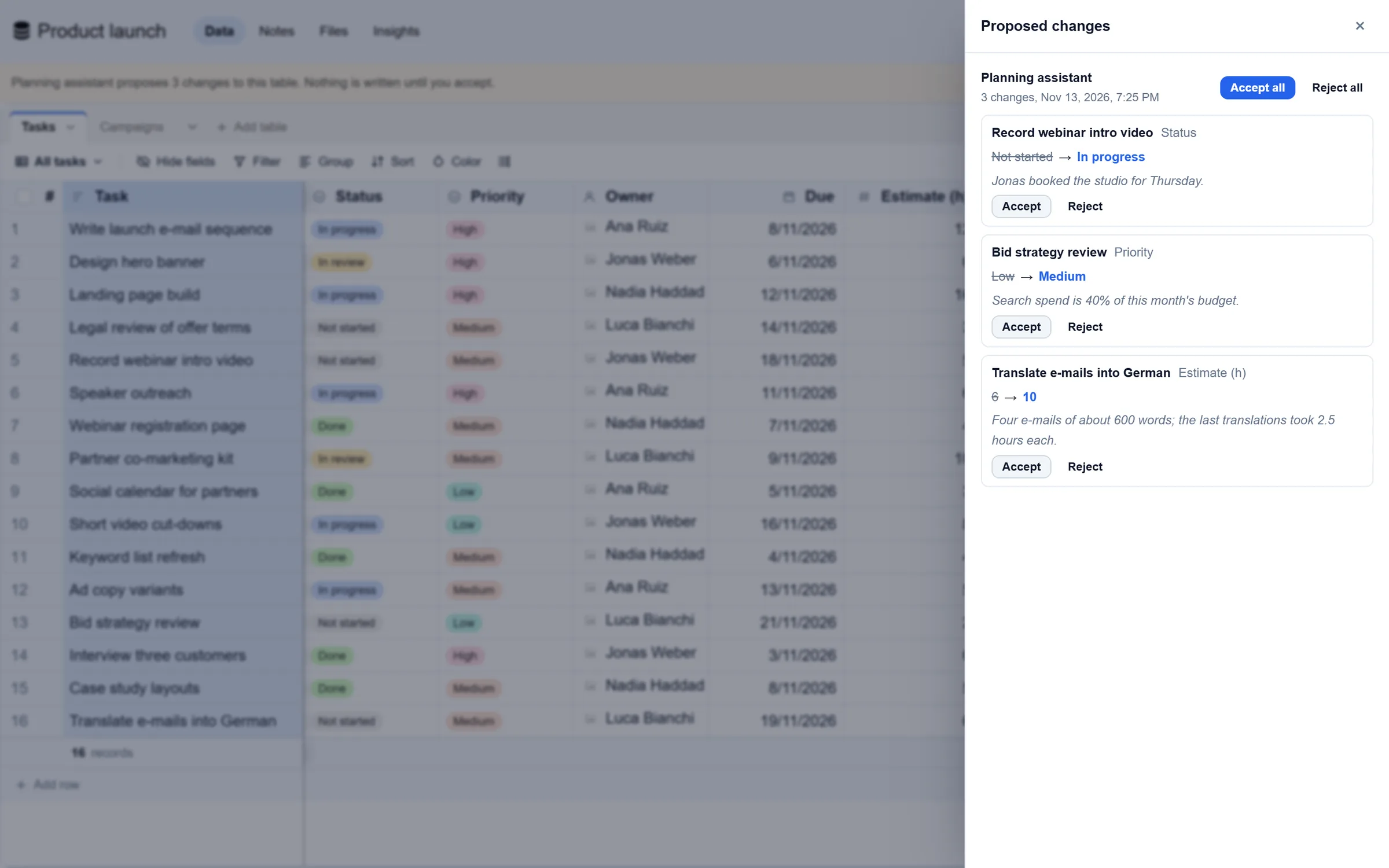
Create or dismiss its ideas
Each idea has a title, why it would help and exactly what it would make, for example "Kanban view, stacked by Status" or "When a record is added, send an e-mail".
- Open the panel with Assistant, or click See on the line over the table that counts the ideas.
- Under Ideas, click Create to make it, or Dismiss to drop it.
A new view goes into the views list. A new automation is created switched on and appears under Automations. A new interface starts as a draft for you to publish.
The daily look
Once a day the assistant also looks at the tables that changed. A workspace owner can switch this off: Settings, Integrations, the AI tab, Planning assistant: look once a day at the tables that changed.
Good to know
- People who can edit the base can ask for a look and dismiss ideas. Only base owners can create them.
- Each look reads the table's fields, up to 200 of its records, and the names of its views, automations and interfaces. It never sends keys, files or other tables' records.
- Each look is paid by the workspace's AI key, at the provider's prices.
- Limits: 40 looks a day per workspace, one look a minute per table, and at most 25 fixes and 6 ideas per look.
- On a phone there is no line over the table: the Assistant button shows how many fixes and ideas are waiting.