In Artavolo, AI agents now work on your tables as colleagues with their own names. Each agent has its own token and its own access to each base, and either writes directly or proposes changes that a person accepts or rejects. A workspace owner can undo everything an agent wrote in the last 24 hours. A new planning assistant looks at a table and proposes fixes and ideas, using the AI provider your workspace chooses: OpenAI, Claude or Mistral, or a model in your own network on a self-hosted instance.
An agent is a member with its own name
A workspace owner makes agents in the base's settings, under AI agents. Choose New agent, give it a name, say whether you review its changes or it writes directly, and set its access to the base: no access, read, or read and change. A new agent is reviewed by default. Its token is shown once, with how to connect it; New token makes another and stops the old one.
Behind the scenes an agent is a member of the workspace marked as an agent. Everything that applies to a person applies to it: roles per base, which tables it may see, record rules such as "only records where Owner is them", the audit log and the record's history, where its changes are credited to its name. It cannot sign in to the website. The same token works with the data API, the Airtable-compatible API and the AI connector, so one agent can be a script, an n8n workflow or an assistant in a chat app.
The agents panel shows each agent's changes this week and the share of its proposals people accepted. Removing an agent ends its token and access, rejects its undecided proposals, and keeps its name in the history.
Review: nothing is written until a person accepts
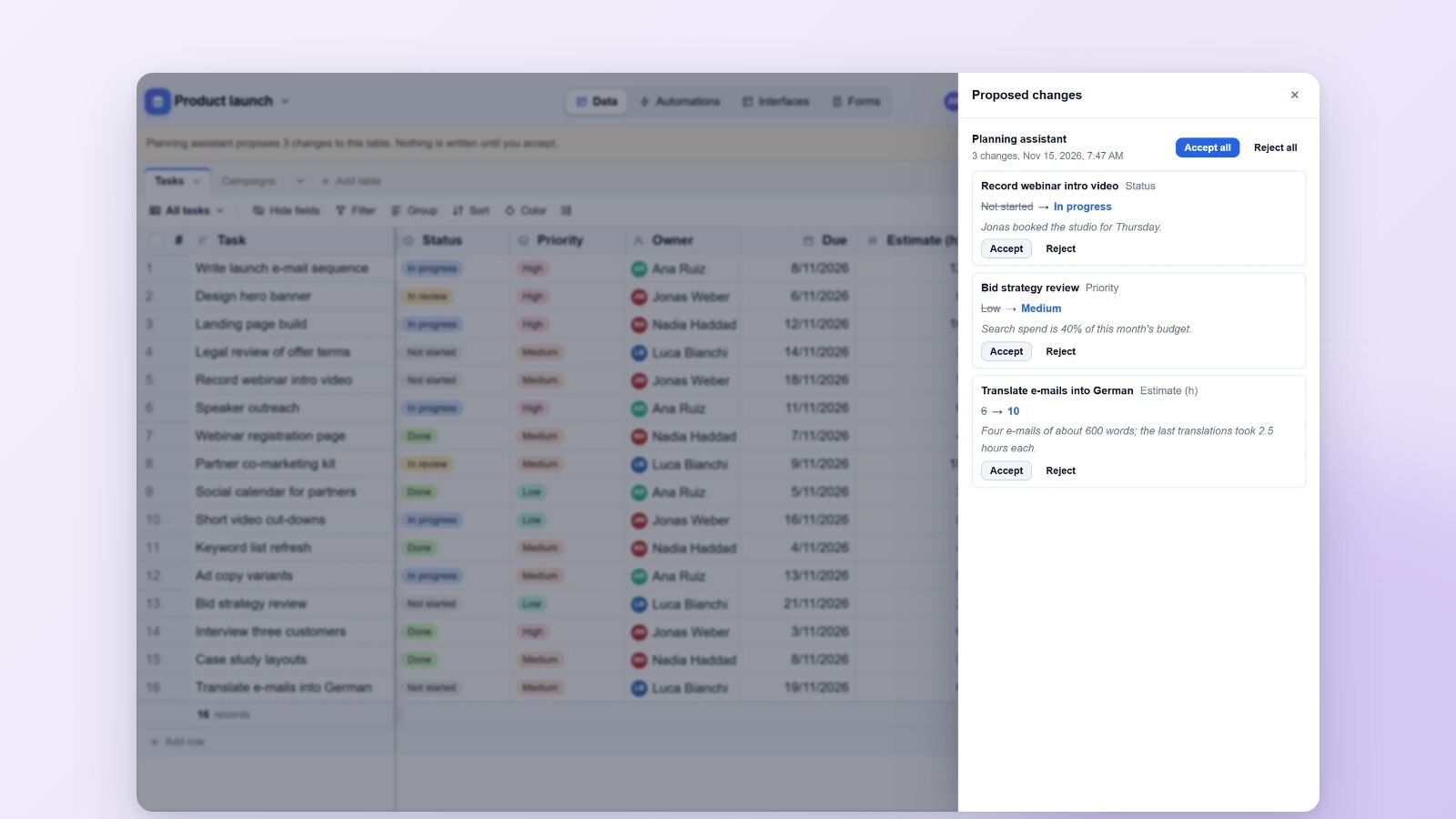
When an agent in review mode changes a record, each changed field is held as a proposal. A line over the table says who proposes how many changes, with Review. The review drawer lists every change by agent: the record, the field, the current value struck through, the proposed value, and the reason the agent gave. You decide per change with Accept or Reject, or per batch with Accept all and Reject all.
An accepted proposal is written as your edit, and the history reads, for example, "Invoice bot, accepted by Dana". It is written only if the cell still holds what the agent saw; if someone changed it in the meantime, the proposal is marked stale and nothing is written. Read-only members may look at proposals, and agents may not decide on them.
One limit to know: review mode holds changes to existing records. New records an agent adds are written at once, and a record it deletes goes to the trash, where it stays for 30 days and can be restored.
Undo an agent's last day
If an agent did something you did not expect, Undo its last 24 hours in the agents panel reverses everything it wrote in that time, newest first. Changed records get their values back, records it added go to the trash, and records it deleted come back. A cell that a person changed after the agent keeps that person's value, and proposals a person accepted stay, since they were that person's edits. The panel tells you what was reversed and what was skipped. Only workspace owners can do this.
Your own assistant: Claude, ChatGPT and Le Chat
Artavolo has an AI connector for the Model Context Protocol, at /mcp on the same address as the site. In a base, Use in AI chat shows the connector's address with a copy button, short steps for Claude, ChatGPT and Le Chat, and three example prompts written from the open table's own fields.
The assistant acts as you, with your permissions. It finds, adds, changes and deletes records by the names of tables, fields, options and linked records, and a wrong name is answered with the names that work. Before it changes more than five records, and before any delete, it shows a preview (for example "Status: Overdue to Flagged (7)") and changes nothing until it is asked again with the exact records. Undo reverses that connection's latest change. Each person can change up to 1,000 records a day this way, and the record's history reads "Ana Ruiz via Claude". Writing through AI chat is a switch the workspace owner controls.
The planning assistant
The Assistant button in the base's sections opens a planning assistant. With an AI key in the workspace settings, it looks at a table (its fields, views, automations, interfaces and up to 200 records) and answers with two kinds of suggestion:
- Fixes to records, checked field by field and held as proposals of an agent called "Planning assistant" until a person accepts them in the review drawer.
- Ideas for a view, a field, an automation or an interface. A base owner creates one with Create; anyone who can edit can Dismiss it.
Look at this table now asks straight away. The assistant also looks once a day at tables that changed, unless a workspace owner switches that off in the workspace's AI settings. Limits: 40 looks a workspace a day, one a minute per table, and at most 25 fixes and 6 ideas a look. Each look is paid by the workspace's own key, at the provider's prices.
Choose where prompts go
In the workspace settings, the AI tab has Where prompts go, the key and the model. The providers are OpenAI, Claude (Anthropic) and Mistral AI, which is based in the EU. On a self-hosted instance the administrator can add any OpenAI-compatible model running in the company's own network, which needs no key. A workspace picks a provider from that list, never an arbitrary address. The key stays on the server and is never sent to the browser, and the audit log records which provider each request went to. AI fields and AI buttons in your tables use the same provider.
Who this is for
Teams that want AI to do real work on their records (sorting a backlog, filling missing values, chasing overdue items) without giving it a free hand. Review mode, the reasons, the history and the 24-hour undo are there so that you can let an agent loose on a live base and still know, record by record, what it changed and who agreed.
Part 2 of 7 in the series "Artavolo in November 2026". The other parts:
- Part 1: Moving from Airtable to Artavolo without losing anything
- Part 3: Interfaces, forms and QR codes: simple apps on a base
- Part 4: Automations that run on the server, plus Zapier, Make and n8n
- Part 5: Artavolo on your phone: the app, photos, barcode scans and notifications
- Part 6: Import from Excel, Access, monday.com, Asana, Trello and more
- Part 7: The new base screen and Home
Every part is on the blog, and the full list of changes is on What's new. For this part, read AI agents, the planning assistant, connecting Claude, ChatGPT or Le Chat and the AI assistant. Developers can read the agents reference and the AI connector.